2D data
Parcels, 2D buildings, zoning plans, GESUT, BDOT500 and orthophoto in Archicad: data sources, download and what goes into the project.
Updated: 2026-10-19 · add-on 2.1.0
Parcels #
In short: you get the outlines of cadastral parcels in the project as polylines, and parcel numbers as texts. This is the basis of most projects, because every site plan starts from it.
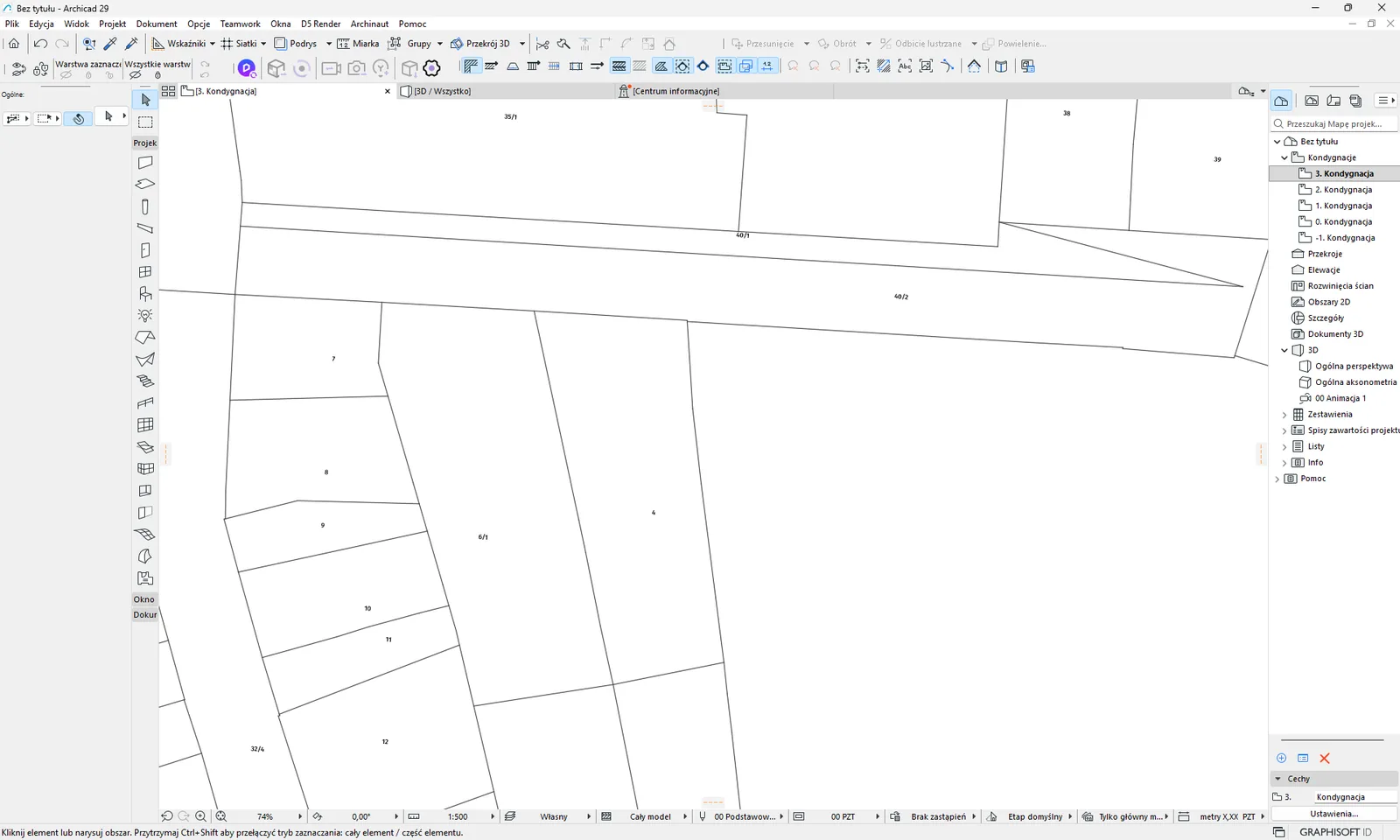
Where the data comes from. From the land and building register (EGiB), which counties maintain. Each county has its own web service, and the add-on knows the service addresses of 380 counties. The county is chosen from the center of the frame - see frame. The data is as up to date as the county service.
How to use it. In the palette tick Działki + numery (Parcels + numbers) (the option is ticked by default), set the frame and click 1. Pobierz (1. Download), then 2. Dodaj do projektu (2. Add to project). 2D buildings are downloaded from the same service, so it is worth taking parcels and buildings together.
What goes into the project
| Layer in Archicad | Element type | Notes |
|---|---|---|
GIS_DZIALKI | Polyline | The outline of each parcel, including holes. The pen and line type come from the default settings of the tool in Archicad. |
GIS_DZIALKI | Text | The parcel number in the middle of the parcel, text height 1.5 mm. |
Limits and tips
- The add-on has no limit of its own on the frame size for parcels, but slow county services are better queried with a small frame.
- The county at the center of the frame decides everything. When the frame overlaps a neighboring county, you will not get its parcels - more in the section on the frame.
- If the county does not publish the service, you will see the message “Powiat (TERYT xxxx) nie publikuje WFS EGiB w EZiU.” (The county (TERYT xxxx) does not publish an EGiB WFS in EZiU.). When the service does not respond: “Powiatowa usluga WFS EGiB nie odpowiada.” (The county EGiB WFS service does not respond.).
- The add-on takes the parcel number from the service attributes. Services differ in field names, so in rare cases the number may look different from the register.
For the curious
The EGiB services are county WFS services from the EZiUDP registry. The add-on tries up to four variants of axis order and coordinate system (WFS 2.0 with N,E and E,N axes, the PL-2000 system of the given zone, WFS 1.1). If the server does not filter by area at all, it downloads the whole layer (up to 200,000 objects) and clips it itself.
Related: 2D buildings, Frame, Target layers. Have a problem? See messages and solutions.
2D buildings #
In short: you get building outlines as fills, with holes for courtyards. This is a flat map, and 3D building solids are in the sections LOD1 and LOD2.
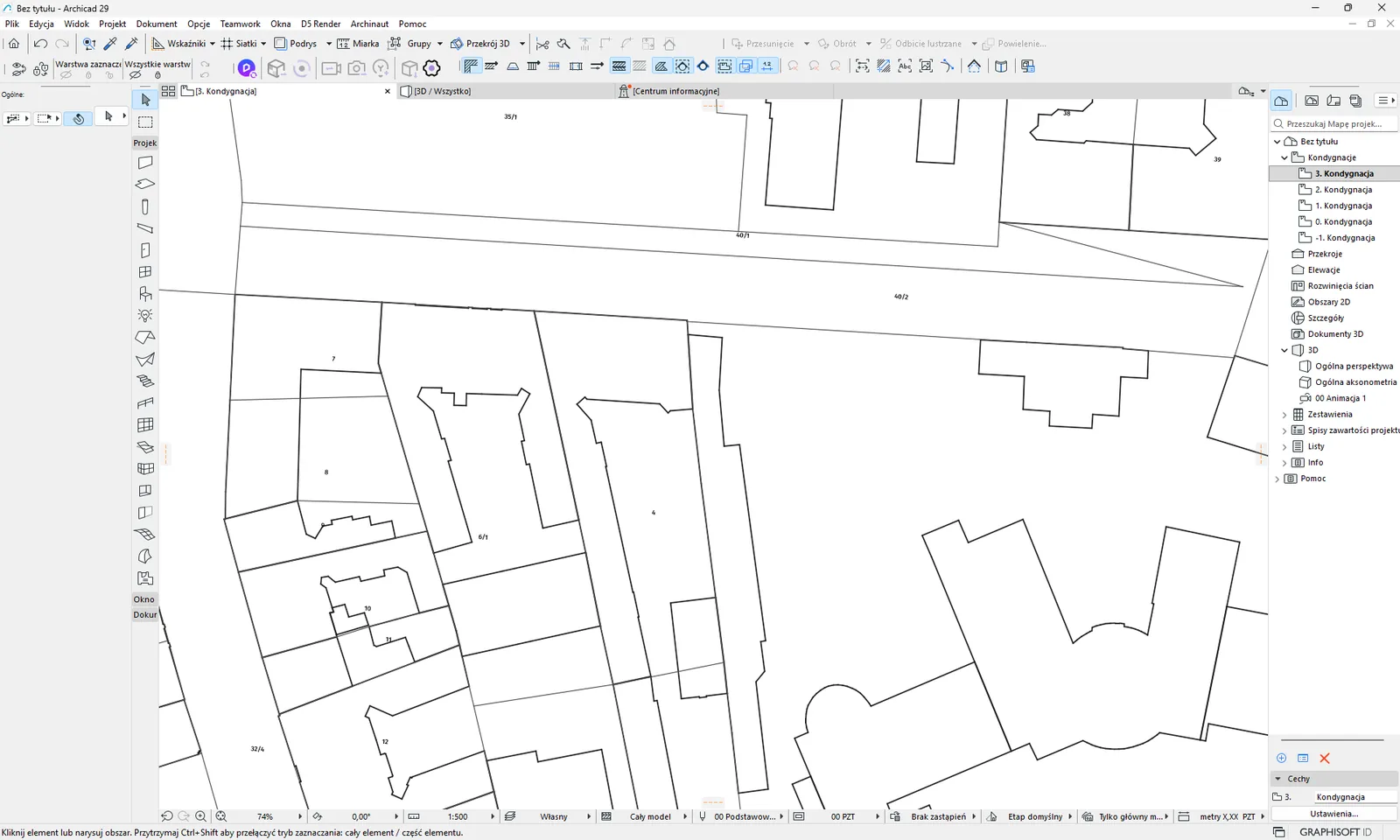
Where the data comes from. From the same county EGiB service as the parcels. If the county service returns no buildings, the add-on tries backup data from BDOT10k (the layer of new buildings). This backup source contains only new objects, so it may be incomplete - then you get the message “Budynki z BDOT10k NoweBudynki (fallback - tylko nowe obiekty).” (Buildings from BDOT10k NoweBudynki (fallback - new objects only).).
How to use it. Tick Budynki (Buildings) (ticked by default) in the block “Warstwy 2D do pobrania” (2D layers to download). Then proceed as for parcels.
What goes into the project
| Layer in Archicad | Element type | Notes |
|---|---|---|
GIS_BUDYNKI | Fill | With holes. Pen, pattern and colors from the default settings of the Fill tool in Archicad. |
Limits and tips
- Range and limits as for parcels.
- Some county services return parcels but do not filter buildings by area. The add-on reports this with an error message about the configuration of the county server.
- When there is no data for the frame, you will see “Brak dzialek dla tego obszaru.” (No parcels for this area.) or the warnings from the list in the section messages.
Related: Parcels, 3D buildings LOD1. Have a problem? See messages.
Local zoning plans (MPZP) #
In short: you get the drawing of the local zoning plan (MPZP) as an image placed under your elements. It is an image from the municipality service, not zones you can edit.
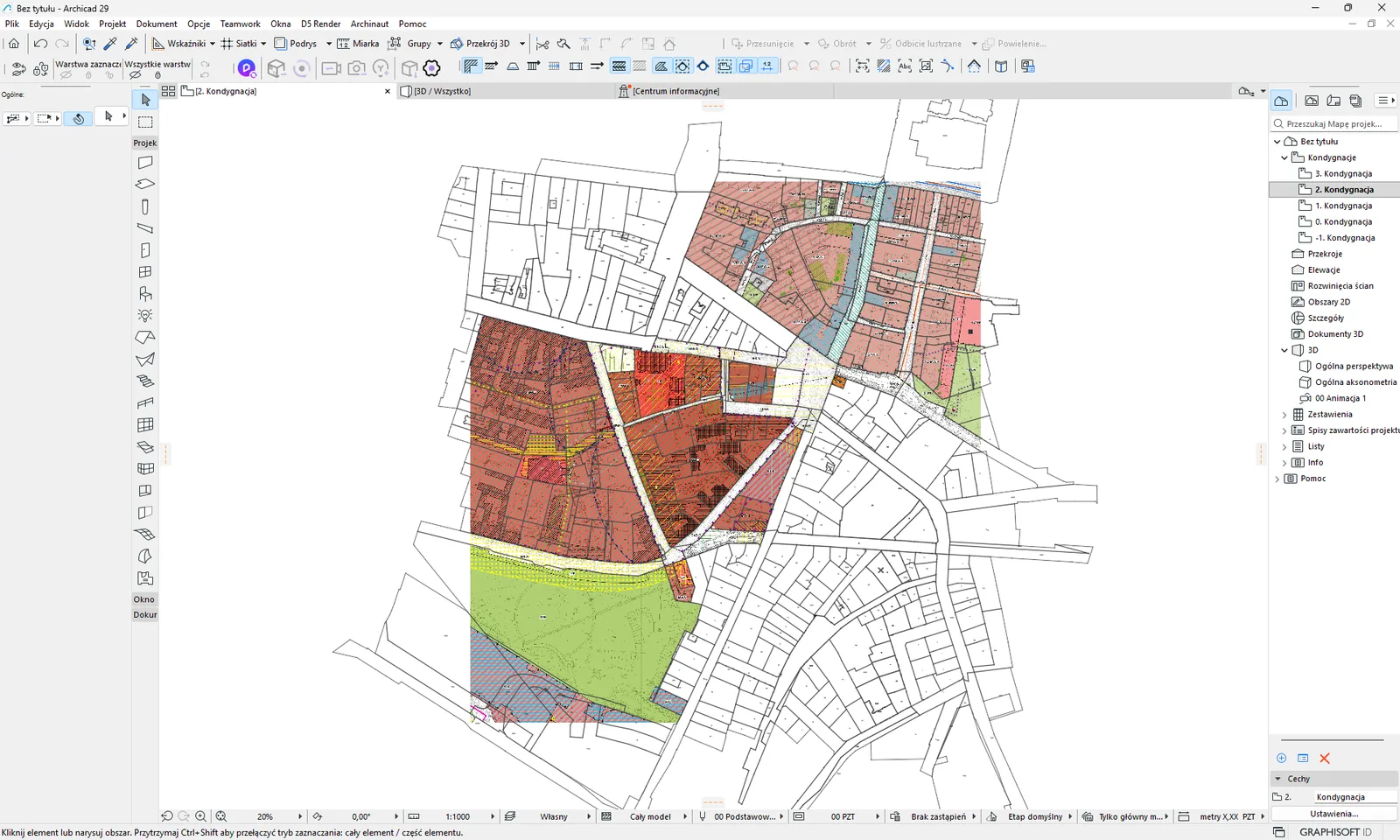
Where the data comes from. From map services provided by municipalities. The add-on's table covers 2424 municipalities, of which 2305 have a service address with the plan drawing. The other municipalities do not provide it at all. The municipality is determined from the center of the frame. The graphics differ between municipalities (each draws the plan in its own way), and the add-on does not unify anything. After you tick the option, a semi-transparent overlay with the extent of plans across the country appears on the map, so you can see whether there is any plan here at all. The overlay does not go into the project.
How to use it. Tick MPZP (rysunek planu, rastr) (MPZP (plan drawing, raster)) (the option is off by default). The image quality is set by the list Skala rastrów (Raster scale) - see download and add.
What goes into the project
| Layer in Archicad | Element type | Notes |
|---|---|---|
GIS_MPZP | Image | Tiles side by side at scale 1:1, PNG transparency kept. |
Limits and tips
- It is an image only. The add-on does not create vector MPZP zones.
- The image is divided into tiles of up to 4096 px, at most 4 × 4 tiles in total. At scale 1:1000 this gives a frame up to about 4.6 km on a side, at 1:100 about 460 m. With a wider frame the add-on lowers the resolution and warns you.
- Municipality servers can be unreliable. On an image error the add-on repeats the request with a lower resolution (up to four attempts).
- No plan is not an add-on error: “Brak MPZP dla gminy xxxxxx: brak uslugi WMS w EZiU.” (No MPZP for the municipality xxxxxx: no WMS service in EZiU.) or “MPZP gminy xxxxxx: usluga WMS nie odpowiada albo nie ma rysunku planu.” (MPZP of the municipality xxxxxx: the WMS service does not respond or has no plan drawing.).
- To also place the vector general municipal plan, use the separate option POG. Both options work independently.
For the curious
From the list of layers of the WMS service, the add-on chooses those whose name contains “rysun” (the INSPIRE convention, Polish for “drawing”). If there are none, it takes all layers except extents and outlines of legal acts. The image density is the scale times 0.28 mm per pixel, as in the geoportal.
Related: POG, Raster scale, data coverage. Have a problem? See messages.
General municipal plans (POG) #
In short: you get the zones of the municipality's general plan (POG) as colored fills with zone symbols. The general plan is a new planning document, so coverage is only just growing.
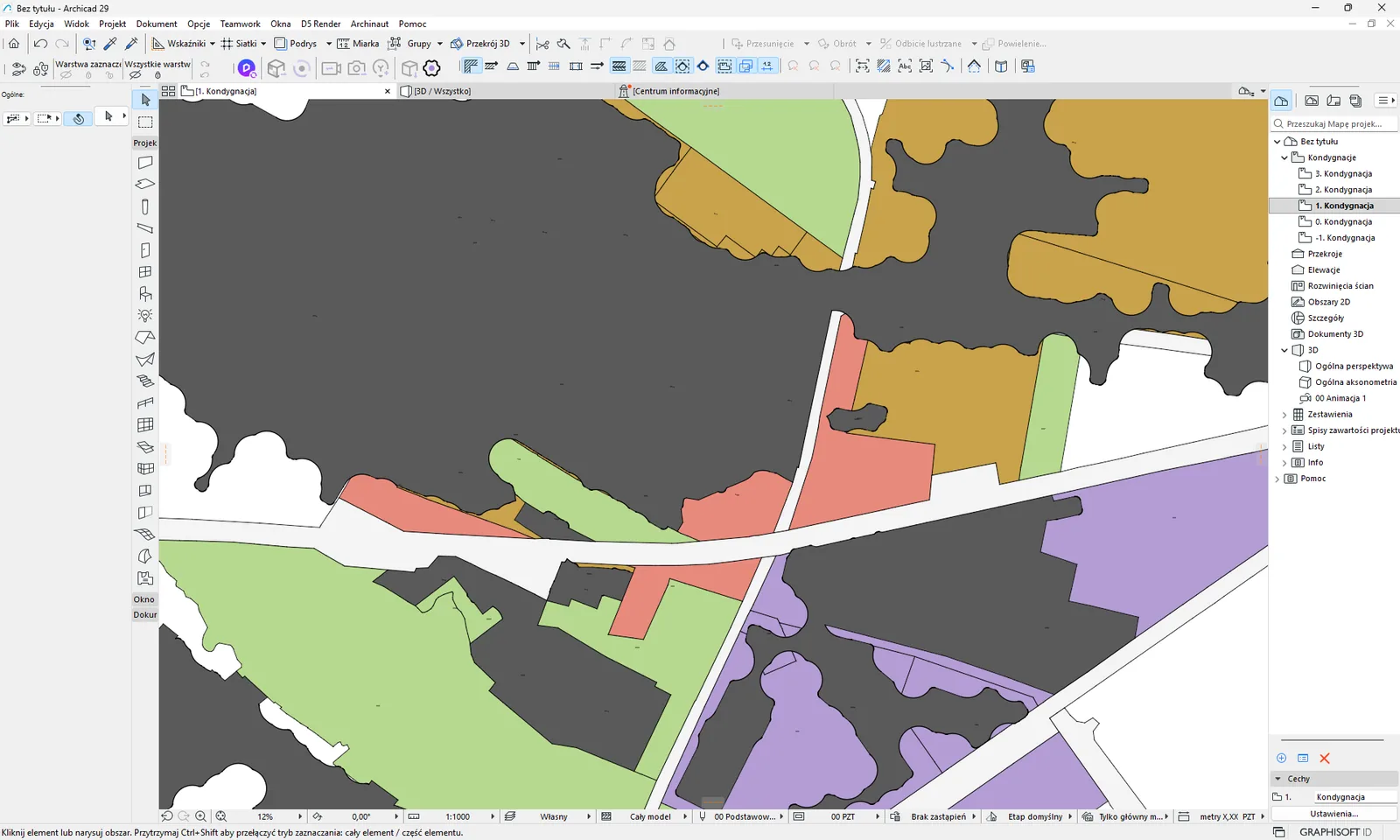
Where the data comes from. From the Urban Planning Registry (rejestr-urbanistyczny.gov.pl). The add-on chooses the general plan of the municipality at the center of the frame. If the municipality has several acts, it takes first the one in force, then the one being adopted, then the one being prepared, and among equal ones - the newest. There is one general plan per municipality in the country, but today only some municipalities have adopted it. A preview of the extent of general plans appears on the map; it does not go into the project.
How to use it. Tick Plan ogólny (POG, strefy) (General plan (POG, zones)) (off by default).
What goes into the project
| Layer in Archicad | Element type | Notes |
|---|---|---|
GIS_POG | Fill | Zone color matching the legend of the general plan (13 symbols). |
GIS_POG | Hatched fill | Infill development areas and accessibility standards, with a transparent background. |
GIS_POG | Fill (outline only) | The inner-city development zone. |
GIS_POG | Text | The zone symbol in its center, height 2.5 mm. |
Limits and tips
- Zones that touch the frame are placed. Zones are not clipped to the frame, so a large zone can stick out beyond it.
- The add-on has no frame size limit for this option.
- Messages: “Brak POG dla gminy xxxxxx (Plan Ogolny jeszcze nieuchwalony w Rejestrze Urbanistycznym).” (No POG for the municipality xxxxxx (the General Plan is not yet adopted in the Urban Planning Registry).) means that the municipality does not have a plan in the registry yet. “POG gminy xxxxxx: akt jest, ale zadna strefa nie wpada w kadr.” (POG of the municipality xxxxxx: the act exists, but no zone falls in the frame.) means that the frame lies outside the zones.
Related: MPZP, data coverage. Have a problem? See messages.
GESUT utilities #
In short: GESUT is the register of utility networks: water, sewage, gas, heating, electricity, telecommunications. The add-on gives them as an image with labels (diameters, materials).
Where the data comes from. From county services (the geodetic resource GESUT), which the county office publishes for each county. The add-on's table knows 380 counties, all have a map service (images), and 216 also have a vector data service. The county is chosen from the center of the frame.
GESUT - image (raster) #
In short: you get a map of the networks from the county server as an image, together with labels. In some counties you get lines instead of an image.
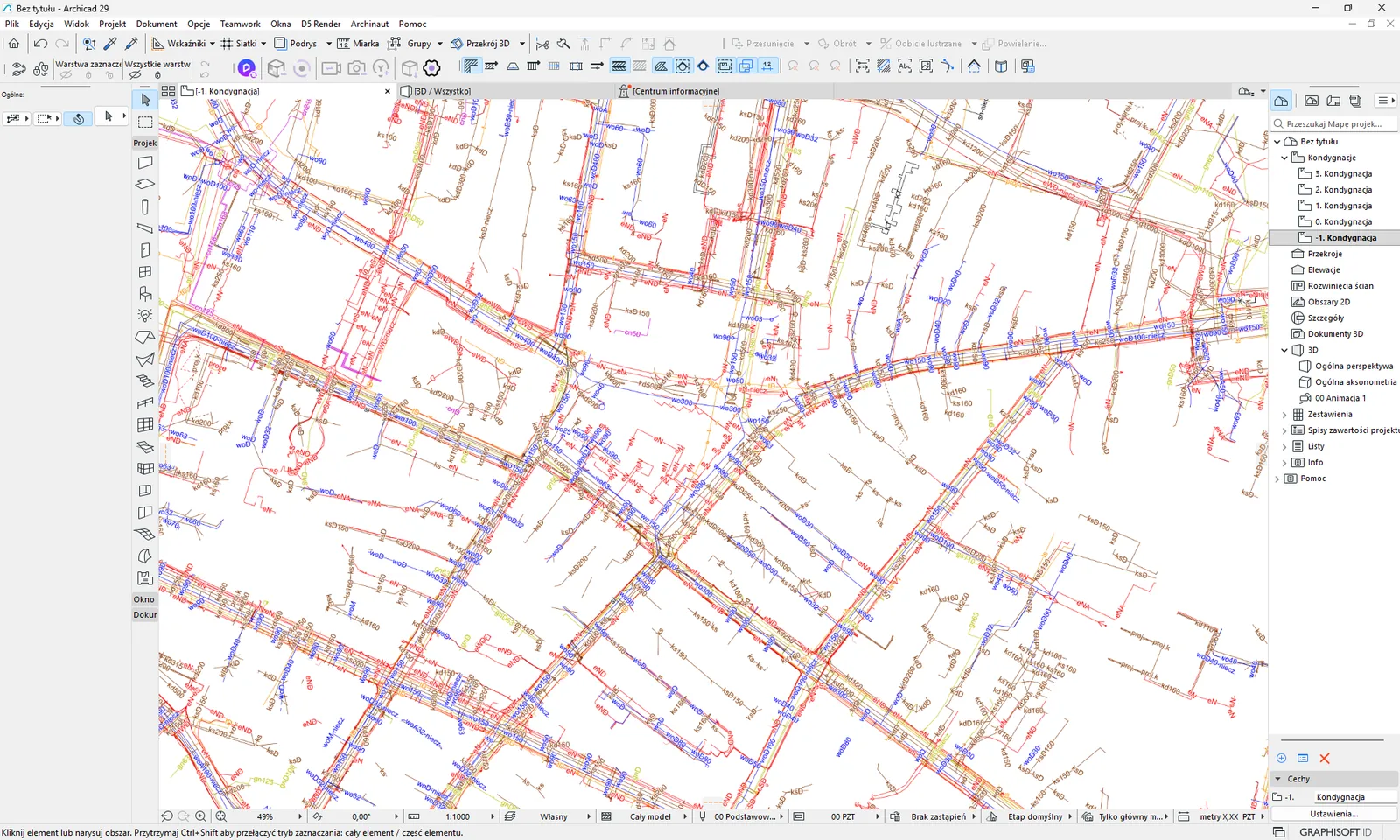
How to use it. Tick GESUT - obraz (rastr) (GESUT - image (raster)) (off by default). The resolution is set by Skala rastrów (Raster scale), but for GESUT the finest scale that works is 1:1000, because the county services do not draw networks at a finer scale and return an empty image.
What goes into the project
| Layer in Archicad | Element type | Notes |
|---|---|---|
GIS_GESUT | Image | From the county map service, transparency kept. |
GIS_GESUT | Polylines | Instead of an image, when the county provides vector data and returns pipes. |
Limits and tips
- The image is divided into tiles of up to 4096 px, at most 4 × 4 tiles in total. With a frame that is too wide you will see a warning that images may be empty. Then reduce the frame to about 5 km.
- When the county does not publish the service: “GESUT: powiat nie publikuje uslugi w EZiU.” (GESUT: the county does not publish the service in EZiU.). When the service does not respond: “GESUT: powiatowa usluga nie odpowiada.” (GESUT: the county service does not respond.).
Related: BDOT500, Raster scale, Target layers, data coverage. Have a problem? See messages.
BDOT500 #
In short: BDOT500 is the large-scale base map maintained by counties: roadways, sidewalks, curbs, walls, stairs. The add-on gives it as an image or as 2D lines.
Where the data comes from. From county services. The add-on's table knows 380 counties, of which 370 have a map service (images). The county is chosen from the center of the frame.
BDOT500 - image (raster) #
In short: you get the base map from the county server as an image.
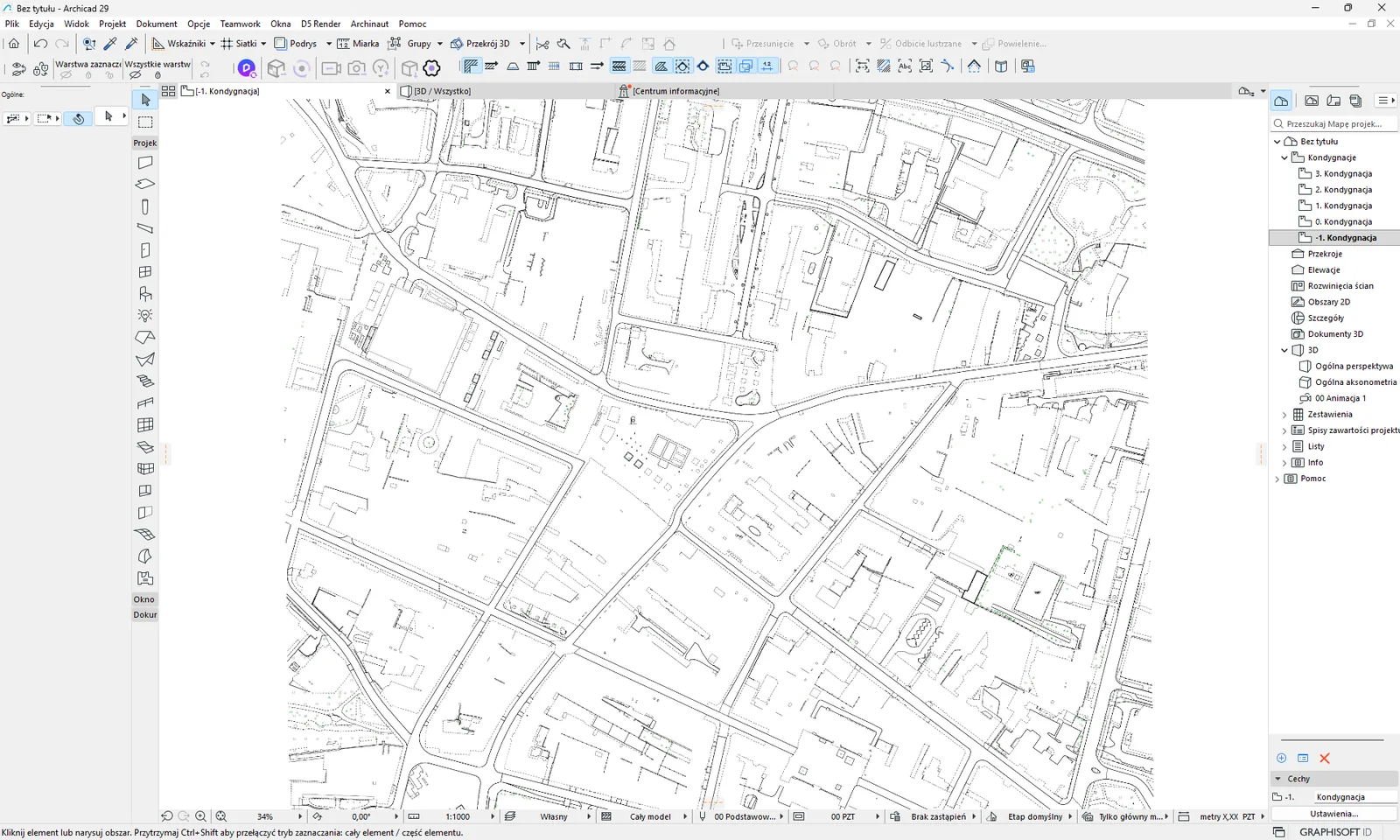
How to use it. Tick BDOT500 - obraz (rastr) (BDOT500 - image (raster)) (off by default). The resolution is set by Skala rastrów (Raster scale), and unlike for GESUT you can also use finer scales here (the services draw down to about 1:2000).
What goes into the project
| Layer in Archicad | Element type | Notes |
|---|---|---|
GIS_BDOT500 | Image | Tiles side by side, up to 4 × 4 tiles of 4096 px. |
Limits and tips
- When the county does not publish the service: “BDOT500: powiat nie publikuje uslugi w EZiU.” (BDOT500: the county does not publish the service in EZiU.). When the service does not respond: “BDOT500: usluga WMS nie odpowiada.” (BDOT500: the WMS service does not respond.).
- With a frame that is too wide the add-on lowers the resolution and warns you.
BDOT500 - lines #
In short: you get roadway and sidewalk edges, curbs, walls and stairs as 2D polylines, each class on a separate layer. The function works in 76 areas.
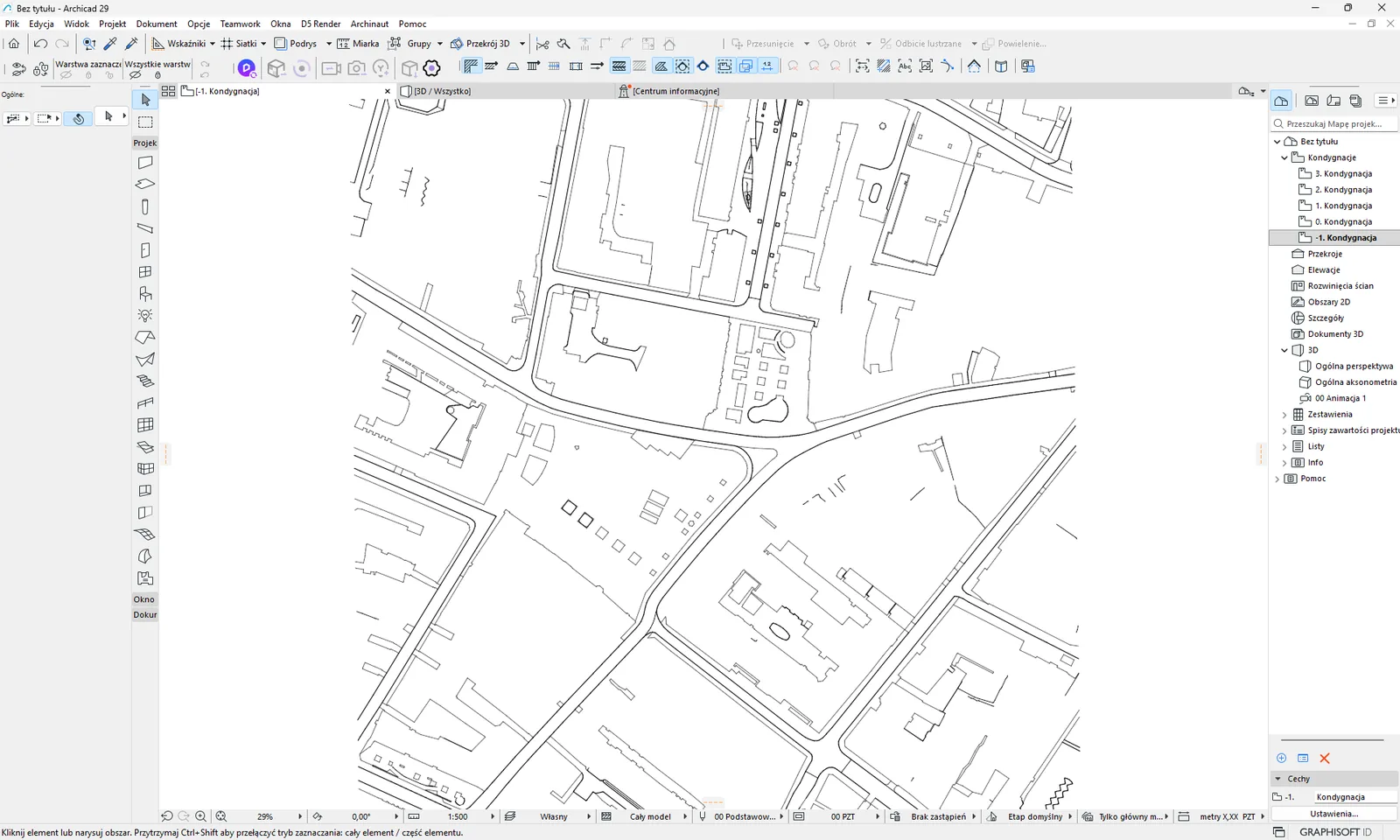
Where the data comes from. From the BDOT500 base map, but only in those counties where the server can return the transport objects separately. There are 76 such areas in the country (75 counties or cities with county rights, and the urban municipality of Zawiercie). The full list is here: archinaut.pl/ulice-zasieg.html. Outside the list you will see the message “BDOT500 jako linie: ten obszar nie jest na liście obsługiwanych (archinaut.pl/ulice-zasieg.html) - użyj obrazka BDOT500.” (BDOT500 as lines: this area is not on the list of supported areas (archinaut.pl/ulice-zasieg.html) - use the BDOT500 image.).
How it works. The add-on downloads the object classes separately (roadways, sidewalks, curbs, walls, stairs) and turns the area boundaries into polylines. It traces curbs and walls as lines from the image. Bridges do not cut out edges in this option.
How to use it. Tick BDOT500 - linie (BDOT500 - lines) (off by default). The frame cannot be larger than 1 km2. When you tick it together with 3D streets, the download of classes is shared and happens once.
What goes into the project
| Layer in Archicad | Element type | Notes |
|---|---|---|
GIS_BDOT500_JEZDNIA_KRAWEDZ | Polyline | Roadway edges. Also computed for car parks (paved areas). Dark gray pen. |
GIS_BDOT500_CHODNIK_KRAWEDZ | Polyline | Sidewalk edges. Also computed for cycle paths. Dark gray pen. |
GIS_BDOT500_KRAWEZNIKI | Polyline | Curbs, black pen. |
GIS_BDOT500_MURY | Polyline | Walls, black pen. |
GIS_BDOT500_SCHODY | Polyline | Stairs, dark gray pen. In many frames there are no stairs. |
Layers are created only when the frame contains at least one line of the given class. After placing, in the remarks you will see a summary like “BDOT500 linie - krawędzie jezdni: N linii, X m” (BDOT500 lines - roadway edges: N lines, X m).
Limits and tips
- The pixel size depends on the frame: up to 0.36 km2 it is 0.1 m per pixel, up to 1 km2 it is 0.2 m per pixel.
- Lines shorter than 1 m are discarded. Segments are joined, but the add-on does not guarantee one line for a whole street.
- Not every frame will produce all kinds of lines. One of the 76 areas (Konin) does not provide walls, and in one the curbs are shared with other surfaces. Then you will see: “BDOT500 jako linie: w tym obszarze usługa nie udostępnia krawężników ani murów - te linie nie powstaną.” (BDOT500 as lines: in this area the service does not provide curbs or walls - these lines will not be created.).
- Check the result on the plan before you build a project on it.
- During the download you can click Anuluj (Cancel).
Related: 3D streets, GESUT, data coverage. Have a problem? See messages.
Orthophoto #
In short: you get aerial photographs of the area as an image in the project, placed exactly in the coordinates of the parcels. It is a good backdrop for sketches and presentations.
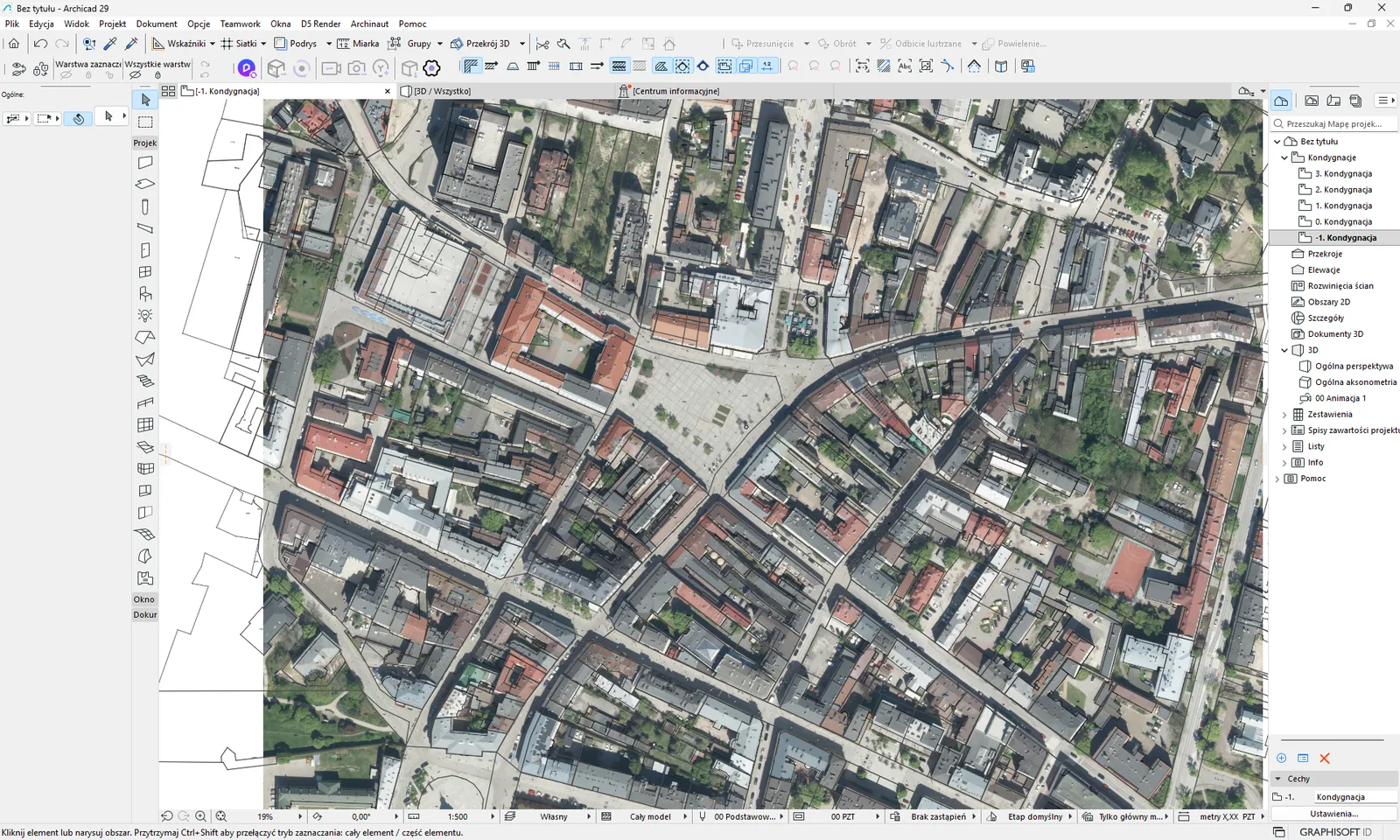
Where the data comes from. From the national orthophoto service of the geoportal (GUGiK), one for the whole of Poland. How current the photos are depends on the area and the year of the flight.
How to use it. Tick Ortofotomapa (Orthophoto) in the block of 2D layers (off by default). Do not confuse it with the “Ortofotomapa” base map from the list in the palette bar, which is only for previewing the map - see map.
What goes into the project
| Layer in Archicad | Element type | Notes |
|---|---|---|
GIS_RASTRY | Image | Tiles side by side at scale 1:1. With no years selected - the newest photo. |
GIS_RASTRY_<YEAR> (e.g. GIS_RASTRY_2005) | Image | One image per selected year - see orthophoto years. |
Limits and tips
- The density is fixed at 0.25 m per pixel. The Skala rastrów (Raster scale) list does not change it.
- The image is divided into tiles of 4096 px (about 1024 m), at most 4 × 4 tiles in total, that is a frame up to about 4 km on a side. With a larger frame the add-on lowers the resolution and warns you.
- The geoportal server sometimes randomly fails to return a tile. The add-on then repeats the request with a lower resolution.
- When the service does not respond: “Ortofotomapa WMS nie odpowiada - rastr pominiety.” (The orthophoto WMS does not respond - raster skipped.).
Orthophoto years #
After you tick Ortofotomapa (Orthophoto), or expand its list with the arrow, you see the years that have photos in the current frame (from 1995 to 2025). The list comes from the GUGiK index and refreshes when you move the map. Each row has the form “YEAR · pixel · type”, where the type is color, black-and-white or infrared (CIR).
- częściowo (partially) next to a year means the photos of that year cover less than 99% of the frame. The rest would be filled by an older photo, so the import gives you a warning with the coverage percentage.
- You can select at most 4 years in one import. When the limit is reached, the other years are disabled.
- Each selected year goes as a separate image to a layer named after the raster layer from the mapping with the year appended, by default
GIS_RASTRY_2005. The images are placed oldest first, so newer ones lie on top of older ones. - With no years selected the import fetches the newest photo as before, onto the
GIS_RASTRYlayer. - A year that has no photos in the frame is skipped with a warning (“brak zdjęć z tego roku w kadrze - rok pominięty”, no photos from this year in the frame - year skipped). The service then quietly serves an older photo, so the add-on does not place it under the wrong year.
Related: Raster scale, Target layers. Have a problem? See messages.